
How to formulate your own thesis topic

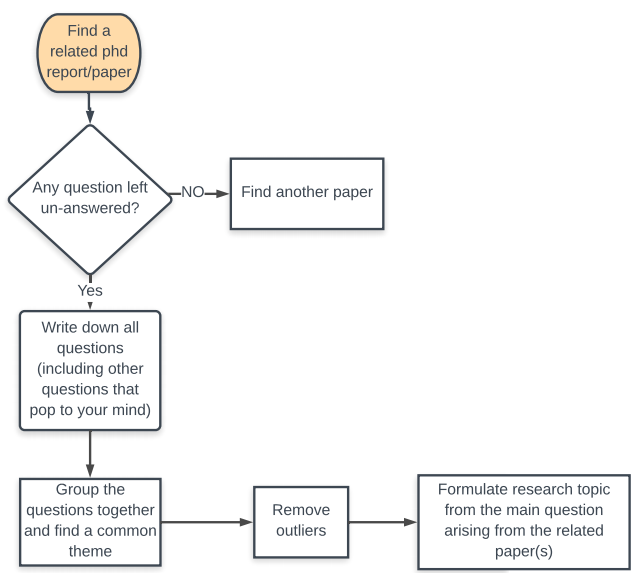
Formulating a thesis topic based on your personal interests should not be too hard! Simply conduct a self assessment and find out what areas in your field interest you most. Thereafter,do the following:


Comments

Popular posts from this blog

Gunicorn vs NGINX Explained

Web applications typically disseminate information via three server layers: Web server   - First layer: Receives request from client(web browser) Application server - 2nd layer: Receives requests from web server if the client is requesting dynamic content Database - 3rd layer: Receives database queries from web framework's request handler methods In this example , nginx is the web server, gunicorn is the application server (interface between nginx and web framwork request handling function) and the database can be assumed to be a lightweight sqlite3 database. Example: Django architecture Alternatives to nginx : Cherokee Apache HTTP server Alternatives for gunicorn: Apache Mongoose

Where to get data-sets to practice data science?

Data is the new science. Big data holds the answers. - Pat Gelsinger, CEO 1. Programmable Web  Description:   This is a site where you can obtain API's to extract data from some of the biggest sites on the internet. Link address:   API Directory Examples : Google maps API, Instagram API, Twitter API etc. 2. Postman API Development Description:   An online tool that you can use to access millions of APIs on the internet. You can also develop your own API if you happen to own a site. Link address:   API TOOL  Examples : Paypal API, Adobe API, Coursera API etc. 3. Facebook graph Description:   An online tool that you can use to access data about Facebook pages. Link address:   API  Examples : graph.facebook.com/youtube  - Access page data, e.g likes, number of posts etc. 4. APIGEE Description:   An online GUI tool that lets your extract and send data to various web platforms Link ad...
Setting up Django for Heroku Deployment

In this tutorial , we are going to show how to deploy your Django 2.0 web application on the Heroku platform. This tutorial assumes that you are familiar with the django framework, git and the Linux command line. In addition if you haven't done so already, register an account with Heroku . Django dependencies SETUP Install virtual env on your linux machine $ sudo apt-get install virtual env A virtual environment such as (virtual env) allows you to run your application in an isolated environment from your local machine. This is useful if you have multiple applications on your computer that use different versions of certain software packages( python 2.7 for application 1 and python 3.6.4 for application 2) 2. Navigate to your working directory to Create and Activate the virtual environment $ virtualenv  .vEnv $ .  .vEnv/bin/activate Take care not to omit the dots! 3. Install django 2.0 using pip ( Note: You need to have python3 and pip pre-installed...